

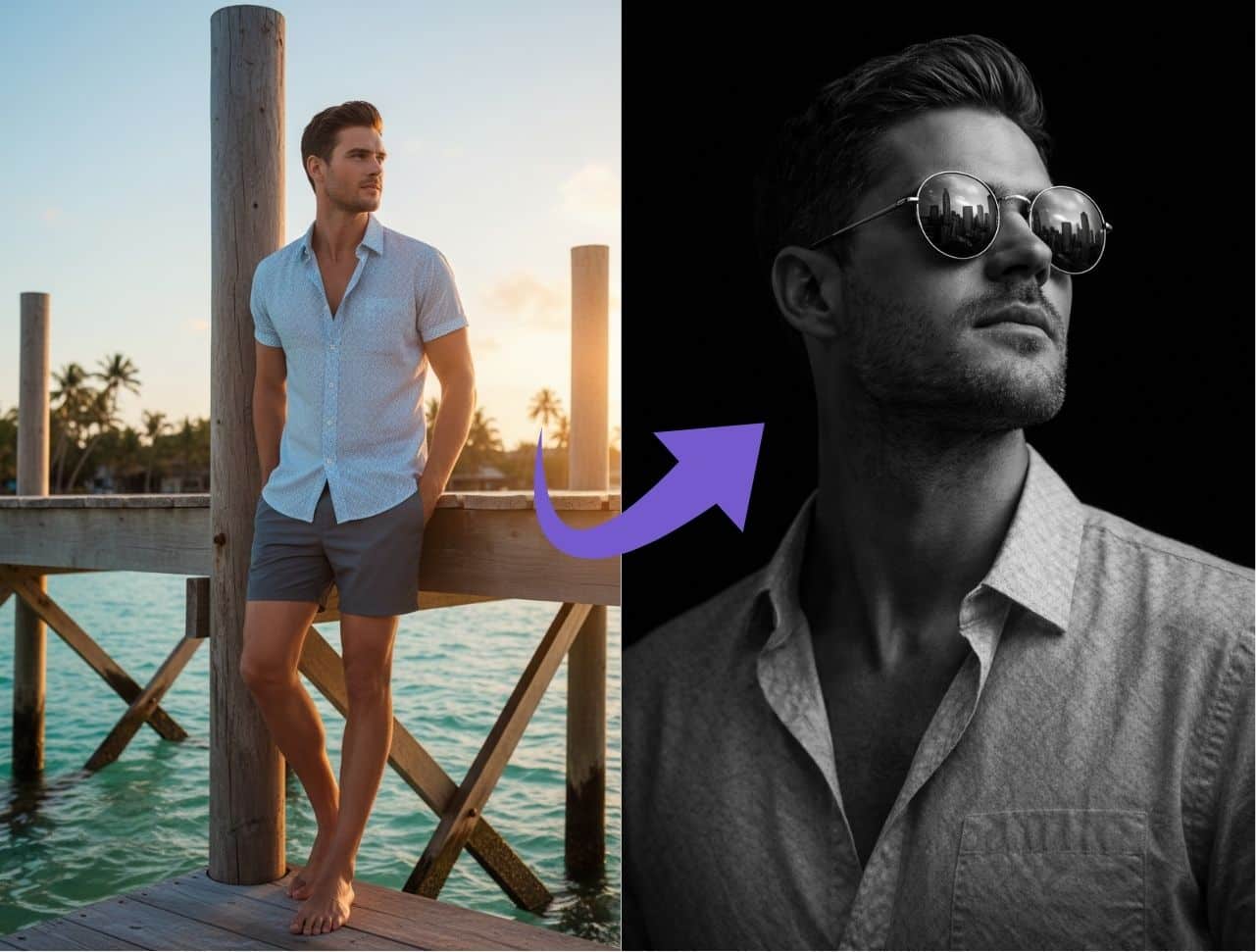
I’ve wasted hours trying to explain to ChatGPT what kind of portrait edit I wanted, only to get a weird, plasticky face with flat lighting that looks nothing like the reference photo.
Sound familiar?
Here’s what changed everything for me: a ChatGPT prompt to edit photo copy paste that’s so detailed, ChatGPT actually understands what you want the first time. No more back-and-forth. No more “close, but not quite.” Just copy, paste, upload your photo, and let the AI do its thing.
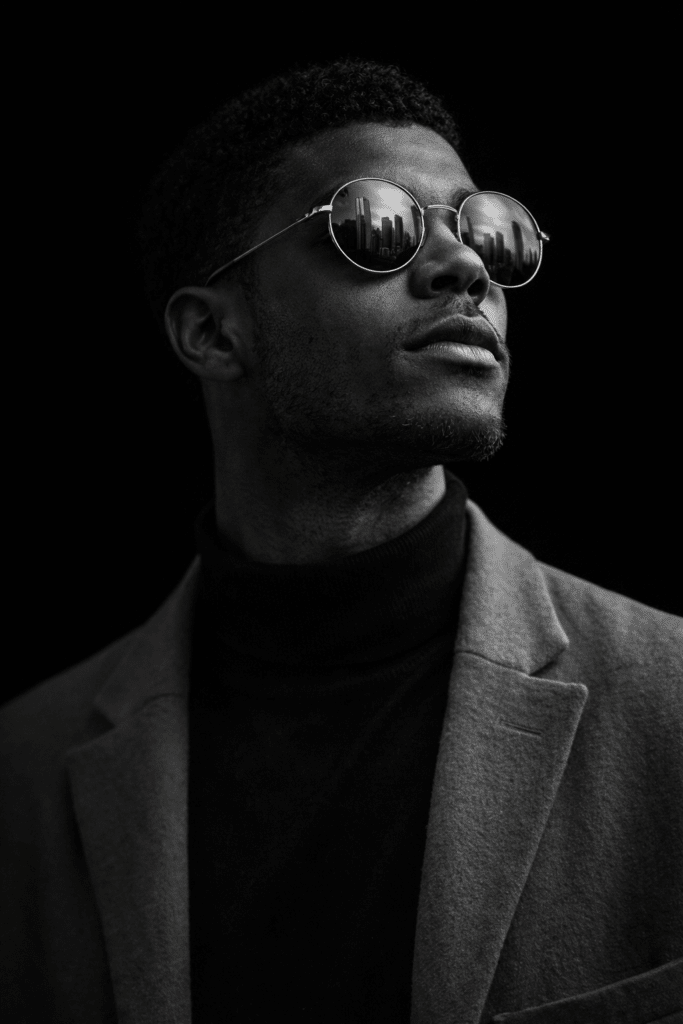
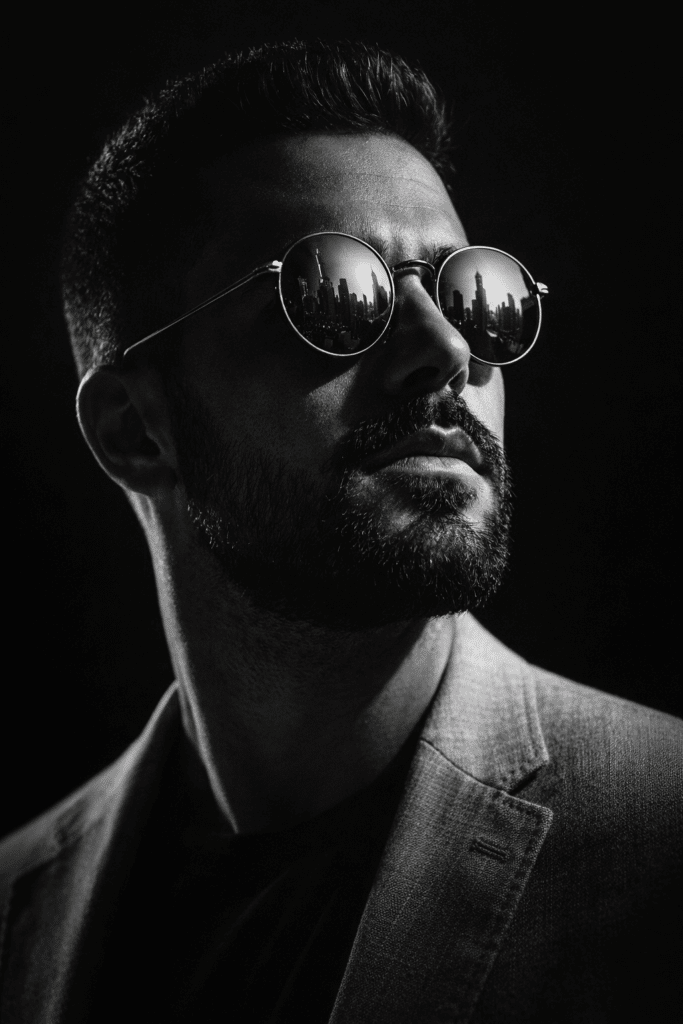
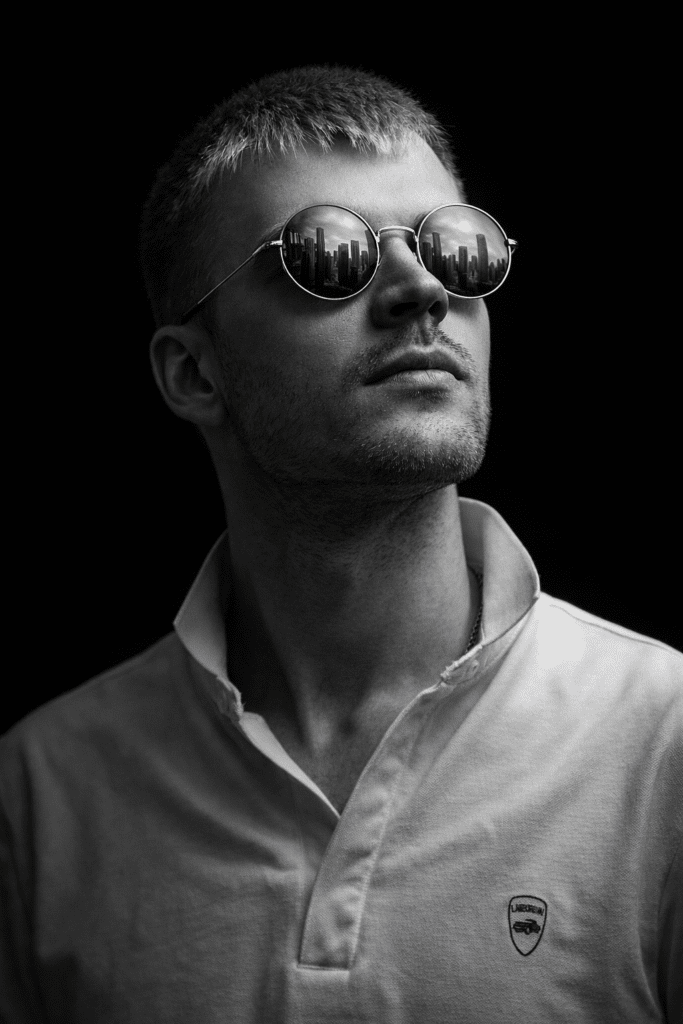
This specific prompt creates dramatic, cinematic black-and-white portraits with high-contrast side lighting, reflective sunglasses, and a mysterious upward gaze all in ultra-high resolution.
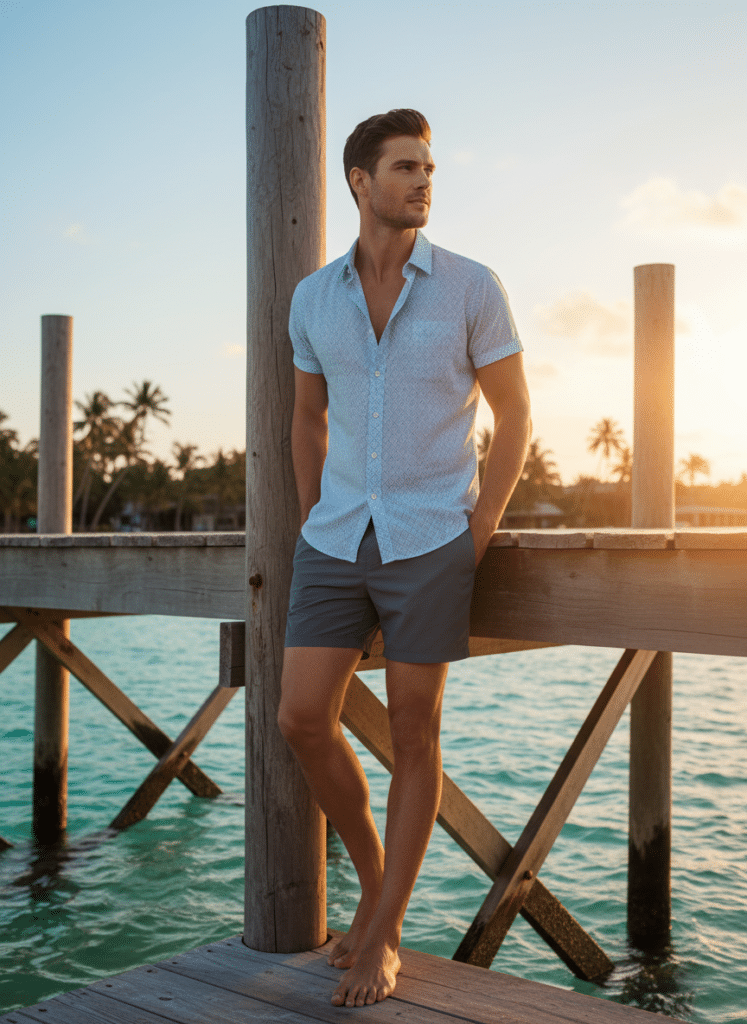
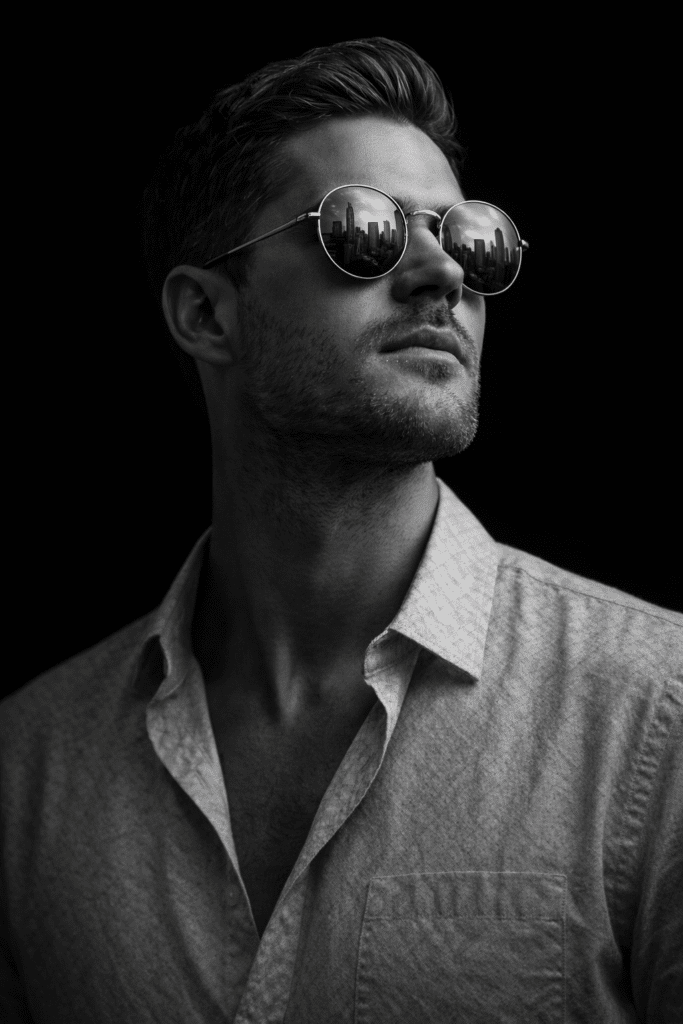
"You are a professional photographer and digital imaging expert specializing in ultra-realistic portraiture and cinematic lighting techniques. I seek your expertise to create a dramatic black-and-white close-up image that adheres to the following specifications:

- Lighting: Employ high-contrast side lighting to accentuate the facial contours and beard texture, producing deep, pronounced shadows.
- Subject Details: Maintain the subject's precise facial structure and hair texture as captured in the original photo without alteration.
- Sunglasses: Feature round, reflective lenses that clearly mirror a detailed city skyline, enhancing the narrative element.
- Composition: Position the subject gazing confidently upward into a dark, minimalist background to evoke a mysterious atmosphere.
- Image Quality: Deliver the final image in ultra-high resolution (4K) to preserve intricate details.
- Style: Ensure the overall mood is cinematic and ultra-realistic, emphasizing depth and texture through monochromatic tones.

Leverage your advanced skills in lighting, composition, and post-processing to faithfully translate these requirements into a compelling and visually striking portrait."
The Copy-Paste Prompt (Ready to Use Right Now)
Here’s your ChatGPT prompt to edit photo copy paste for dramatic black and white portraits:
That’s it. Copy that entire block, paste it into ChatGPT (ChatGPT Plus or free account with DALL-E access), upload your photo, and watch what happens.
Why This ChatGPT Prompt to Edit Photo Copy Paste Actually Works
Most people throw vague instructions at ChatGPT like “make it look cool” or “black and white portrait” and wonder why the results are inconsistent.
This prompt works because it gives ChatGPT exactly what it needs to generate professional-level edits:
- Role assignment: You’re telling ChatGPT to act like a “professional photographer and digital imaging expert,” which shifts how the AI interprets your request.
- Specific lighting instructions: “High-contrast side lighting” is way more useful than “dramatic lighting” because it describes the exact technique.
- Preservation details: Asking to “maintain the subject’s precise facial structure” stops ChatGPT from randomly changing the person’s face.
- Compositional details: The upward gaze, dark background, and round reflective sunglasses add a cinematic, GQ-magazine vibe.
- Quality specs: Requesting “ultra-high resolution (4K)” ensures you get crisp details, not a blurry mess.
When you combine all these elements, ChatGPT’s DALL-E engine has a clear blueprint to follow instead of guessing.
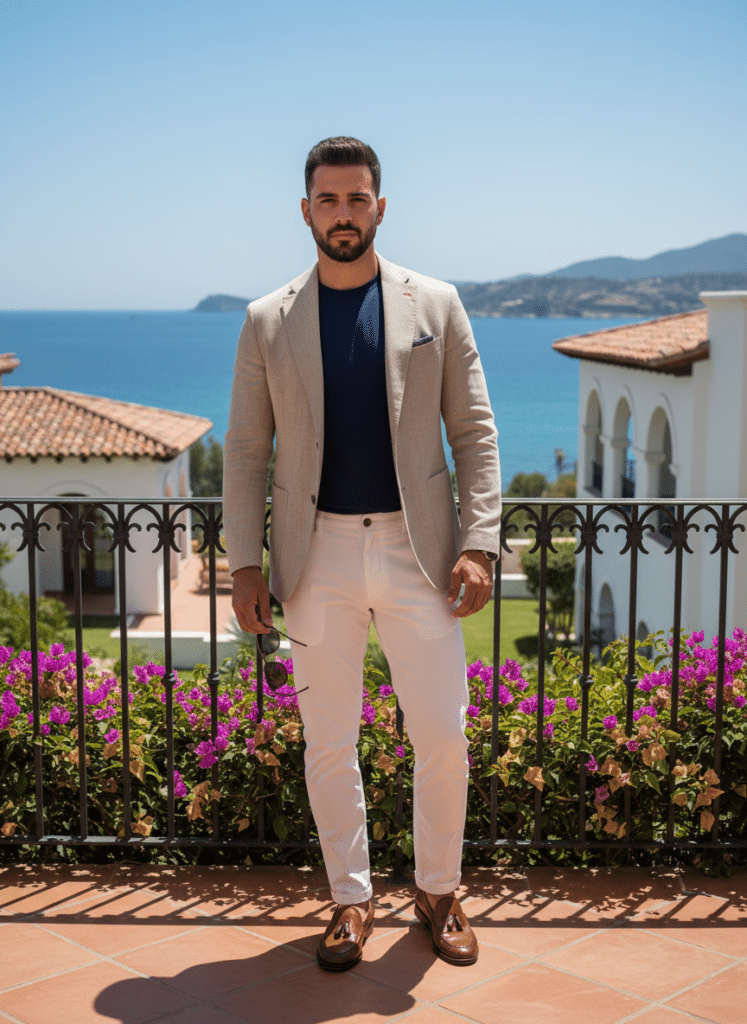
How to Use This ChatGPT Prompt to Edit Photo Copy Paste (Step-by-Step)
If you’ve never used ChatGPT for photo editing before, here’s the full walkthrough.
Step 1: Open ChatGPT and Access Image Editing
Head to chat.openai.com and log in. You’ll need:
- ChatGPT Plus ($20/month) for up to 50 image edits every 3 hours, or
- Free account with 3 edits per day.
Step 2: Upload Your Original Photo
Click the “+” button or the paperclip icon on the left side of the chat box. Select “Add photos & files” and upload the portrait photo you want to transform.
Pro tip: Use a clear, well-lit photo where the face is unobstructed and facing forward for best results.
Copy the dramatic black-and-white portrait prompt from earlier in this post and paste it directly into the chat box underneath your uploaded image.
Hit Enter.
Step 4: Wait for ChatGPT to Generate Your Edit
ChatGPT will process your request in about 10–15 seconds. You’ll see a progress indicator while DALL-E analyzes your photo and applies the transformations described in the prompt.
Step 5: Download or Refine Your Image
Once the image appears, click on it to see options:
- Download to save it to your device.
- Edit to make further tweaks using the selection tool (circle the part you want to change, then describe the adjustment).
- Regenerate if you’re not happy with the result—just ask ChatGPT to “make it brighter,” “adjust the shadows,” or “make the skyline reflection more detailed”.
You can iterate as many times as you want until you get the perfect result.
What Makes This Different From Other Photo Editing Prompts?
There are tons of generic ChatGPT prompts to edit photo copy paste floating around the internet. So why use this one?
| Feature | Generic Prompts | This Dramatic B&W Portrait Prompt |
| Lighting detail | Vague (“good lighting,” “dramatic”) | Specific technique (high-contrast side lighting) |
| Face preservation | Often changes facial features | Explicitly maintains original facial structure |
| Composition guidance | Loose or missing | Clear (upward gaze, dark background, reflective sunglasses) |
| Resolution spec | Rarely mentioned | Requests 4K quality for detail |
| Mood and style | Generic (“cool,” “stylish”) | Cinematic, ultra-realistic, monochromatic tones |
| Consistency | Hit or miss | Reliable, professional-looking results |
The key difference: this prompt treats ChatGPT like you’re briefing a professional photographer, not just throwing keywords at a machine.
Customizing Your ChatGPT Prompt to Edit Photo Copy Paste
You don’t have to use this prompt exactly as-is. Once you understand the structure, you can tweak it for different styles and moods.
- Change the sunglasses style: “aviator sunglasses,” “square vintage frames,” or remove them entirely.
- Adjust the reflection: “mirror a sunset skyline,” “reflect neon Tokyo streets,” or “show a desert highway.”
- Shift the mood: Replace “mysterious atmosphere” with “confident and powerful,” “melancholic and introspective,” or “bold and edgy.”
- Change the background: “white minimalist studio background,” “foggy urban alley,” or “abstract gradient backdrop.”
- Add color grading: Swap “black-and-white” for “warm sepia tones,” “cool blue tones,” or “high-contrast color with desaturated background.”
The framework stays the same: role assignment + lighting + subject details + composition + quality + style.
FAQs About ChatGPT Prompts to Edit Photo Copy Paste
1. What is a ChatGPT prompt to edit photo copy paste?
It’s a pre-written, detailed text instruction you can copy and paste directly into ChatGPT (along with an uploaded photo) to transform your image into a specific style or edit. Instead of writing your own prompt from scratch, you use a ready-made template designed to get consistent, professional results.
2. Do I need ChatGPT Plus to use photo editing prompts?
Not necessarily. ChatGPT Plus ($20/month) gives you up to 50 image edits every 3 hours with faster processing, but free ChatGPT accounts also get access to DALL-E image generation and editing with a limit of about 3 edits per day.
3. Can ChatGPT edit any photo I upload?
ChatGPT doesn’t directly edit your original photo pixel-by-pixel like Photoshop. Instead, it uses your uploaded image as a reference and generates a new, AI-created version that matches your prompt while preserving key elements like facial structure, pose, and composition. The newer models (late 2025 and into 2026) are much better at keeping the person recognizable and following detailed instructions.
4. How do I make sure ChatGPT keeps the same face in the edited photo?
Two things help a lot:
- Use clear, specific language like “maintain the subject’s precise facial structure and hair texture as captured in the original photo without alteration.”
- Upload a high-quality reference photo where the face is well-lit and clearly visible.
If ChatGPT still changes too much, try adding phrases like “same person,” “exact face,” or “do not alter facial features”.
5. What if I don’t like the first result? Can I ask for changes?
Absolutely. You can refine your results by asking ChatGPT to make modifications. For example:
- “Make the shadows deeper and more dramatic.”
- “Add more detail to the city skyline reflection in the sunglasses.”
- “Make the background completely black with no gradient.”
You can also use the selection tool in ChatGPT’s image editor to highlight a specific part of the image (like the sunglasses or background) and request targeted edits.
6. Can I use this prompt for photos of women, or is it only for bearded men?
You can absolutely adapt this dramatic black and white portrait prompt for anyone. Just adjust the relevant details:
- Remove “beard texture” if the subject doesn’t have a beard.
- Change “gazing confidently upward” to “looking directly at the camera” or “glancing to the side” for different moods.
- Swap “round reflective sunglasses” for another accessory (statement earrings, a hat, or no accessory at all).
The core structure—role assignment, lighting, subject preservation, composition, quality, and style—works for any portrait subject.[2][1]
7. Where else can I use these copy-paste photo editing prompts?
While this article focuses on ChatGPT, similar prompts work in:
- Microsoft Bing Image Creator (free, powered by DALL-E)
- Midjourney (with slight syntax adjustments)
- Adobe Firefly (if you describe the edit as instructions)
- Google Gemini with image editing features
- Grok AI (X Premium users)
The key is understanding the structure so you can adapt the wording for each platform.
Real-World Uses for This Dramatic Portrait Prompt
You might be thinking, “Okay, cool prompt, but when would I actually use this?”
Here are some practical scenarios where this ChatGPT prompt to edit photo copy paste comes in handy:
- Social media branding: Create a cohesive, cinematic look for your Instagram, LinkedIn, or Twitter profile.
- Portfolio headshots: Turn a casual selfie into a polished, editorial-style portrait for your portfolio or website.
- Content creation: Generate eye-catching featured images for blog posts, YouTube thumbnails, or newsletter headers.
- Personal projects: Make stylized portraits for gifts, prints, or creative experiments.
- Client work: If you’re a designer or marketer, use this as a starting point for mood boards or concept pitches.
The ultra-realistic, high-contrast black-and-white style works especially well for anything that needs a sophisticated, editorial, or moody vibe.
Tips for Getting Better Results With Your ChatGPT Photo Editing Prompts
After testing dozens of photo editing prompts, here’s what I’ve learned:
Be hyper-specific about what you want
Vague prompts like “cool black and white photo” give you vague results. Instead, describe the lighting technique, the mood, the composition, and the quality level.
Starting your prompt with “You are a professional photographer and digital imaging expert” tells ChatGPT to approach the task with a specific expertise mindset.
If you want multiple changes, don’t cram them all into one mega-prompt. Make one adjustment at a time and use the iterative editing feature to refine.
Upload high-quality reference photos
Blurry, dark, or low-resolution original photos make it harder for ChatGPT to generate clean results. Use the best-quality image you have.
When you find a ChatGPT prompt to edit photo copy paste that works really well for you, save it in a doc or note so you can reuse it with different photos.
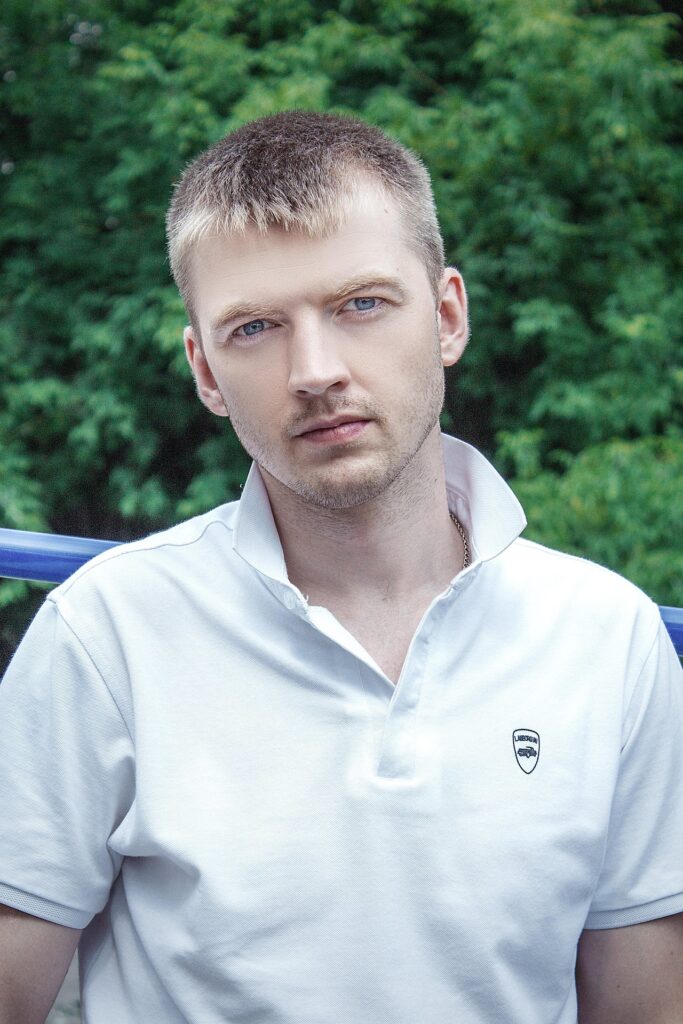
Your Turn: Try This ChatGPT Prompt to Edit Photo Copy Paste
You now have a professional-grade ChatGPT prompt to edit photo copy paste that creates dramatic, cinematic black-and-white portraits with high-contrast side lighting, round reflective sunglasses, and ultra-realistic 4K detail.
No more guessing. No more frustrating back-and-forth. Just copy, paste, upload, and watch ChatGPT do the heavy lifting.
What to do next:
- Copy the full prompt from earlier in this post.
- Open ChatGPT and upload a portrait photo.
- Paste the prompt and hit Enter.[4][1][3]
- Download your cinematic portrait and share it—tag your favorite result on social or drop a comment below with what you edited and how it turned out.
If you found this helpful, bookmark this page and come back whenever you need a reliable photo editing prompt you can trust. Happy editing!